
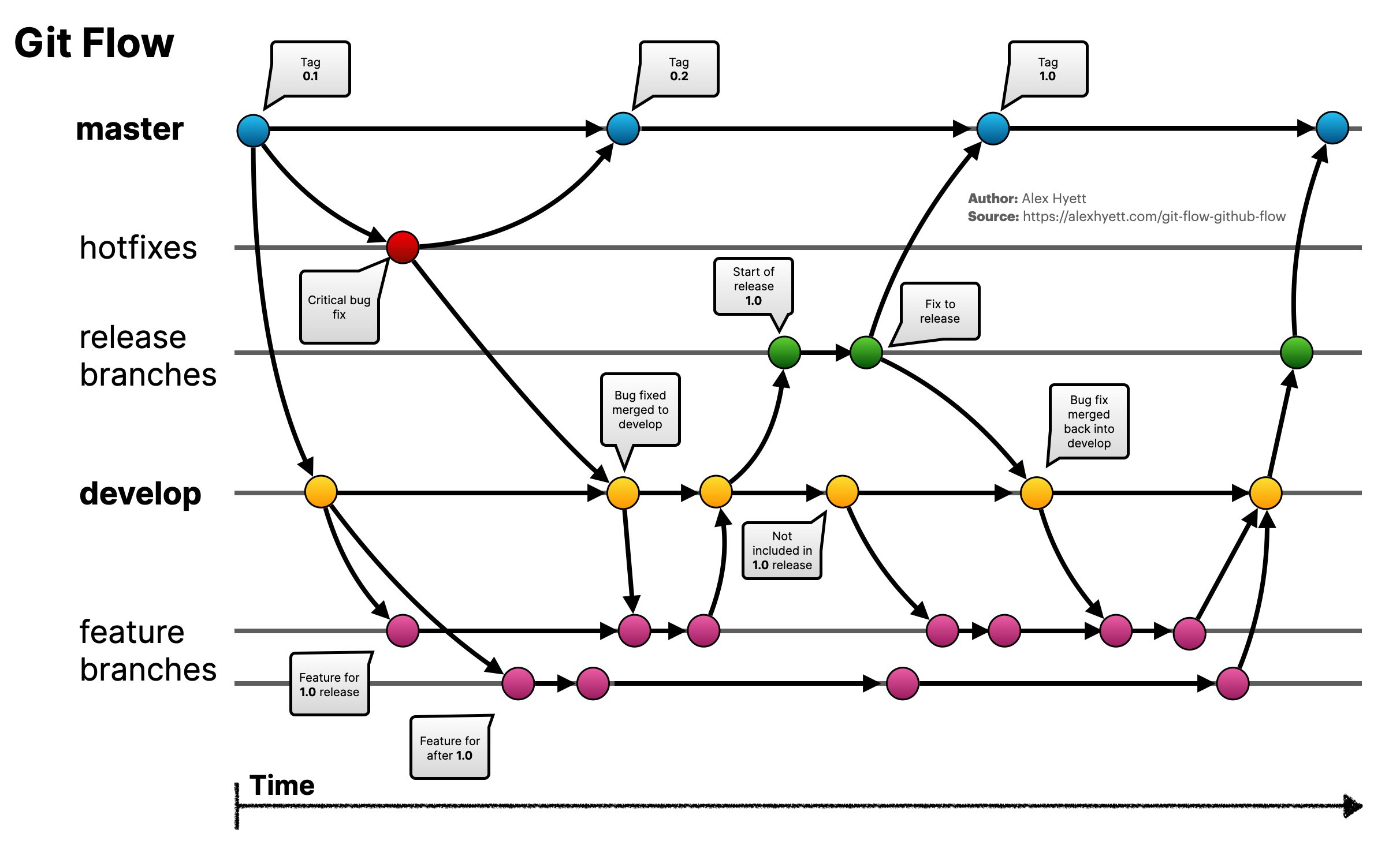
Team of 5, everyone pushes straight to develop, conflicts everywhere, releases ship with half-finished features. Gitflow exists to solve exactly this: clear separation between code being developed, code ready for release, and code running in production.
What Is Gitflow?
Gitflow is a branching model — a set of rules for creating, naming, and merging branches in a team. It defines 5 branch types with clear roles, enabling parallel development without stepping on each other’s code.
NOTEGitflow is not a required tool. You can use the
git flowCLI or manually create branches following the convention — same result.
The 5 Branch Types
main (master)  ──●──────────────●──────────●──  (production)
                 │              ↑          ↑
                 │         release/v1.1  hotfix/fix-crash
                 │              ↑          │
develop        ──●──●──●──●────●──●────────●──  (integration)
                    │     │
                 feature/ feature/
                 login    payment
Permanent Branches
| Branch | Contains | Merged from |
|---|---|---|
main | Code running in production. Each commit = a deployed version | Only from release/* or hotfix/* |
develop | Latest completed code, waiting to be packaged for release | From feature/*, release/*, hotfix/* |
Non-negotiable rule: No one commits directly to main or develop. Every change goes through a Pull Request.
Temporary Branches
| Branch | Created from | Merges into | When to use |
|---|---|---|---|
feature/* | develop | develop | New feature development |
release/* | develop | main + develop | Release packaging, bug fixes only |
hotfix/* | main | main + develop | Urgent production fixes |
Practical Workflows
1. Developing a Feature
# Create branch from develop
git checkout develop
git checkout -b feature/add-payment

# Code and commit regularly
git add .
git commit -m "feat: add payment method selection"
git commit -m "feat: integrate Stripe API"

# Push and create Pull Request to develop
git push -u origin feature/add-payment
# → Create PR on GitHub/GitLab, wait for review
After the PR is approved and merged, delete feature/add-payment.
2. Creating a Release
When develop has enough features for the next version:
# Create release branch from develop
git checkout develop
git checkout -b release/v1.1.0

# On this branch, ONLY fix bugs and update version/changelog
git commit -m "fix: validate empty email on checkout"
git commit -m "chore: bump version to 1.1.0"

# Merge into main → deploy
git checkout main
git merge release/v1.1.0
git tag v1.1.0

# Merge back into develop (so develop gets the bug fixes)
git checkout develop
git merge release/v1.1.0

# Delete release branch
git branch -d release/v1.1.0
TIPWith the
git flowCLI, just rungit flow release finish v1.1.0— it merges both ways and creates the tag automatically.
3. Hotfixing Production
Users report a crash in production — can’t wait for the next release:
# Create hotfix from main (currently running in production)
git checkout main
git checkout -b hotfix/fix-crash-on-login

# Fix and test
git commit -m "fix: null check on user session"

# Merge into main → deploy immediately
git checkout main
git merge hotfix/fix-crash-on-login
git tag v1.1.1

# Merge into develop (so develop gets the fix too)
git checkout develop
git merge hotfix/fix-crash-on-login
Conventions
Branch Naming
feature/add-payment-method
feature/JIRA-123-user-profile
bugfix/fix-null-ref-checkout
release/v1.2.0
hotfix/fix-crash-on-login
Pattern: type/short-description or type/TICKET-ID-description.
Commit Messages
Use Conventional Commits:
feat: add payment method selection
fix: resolve null reference on checkout
chore: update CI pipeline config
refactor: extract validation logic to service
docs: add API endpoint documentation
Benefits: auto-generated changelogs, easy bug tracing, CI/CD can auto-determine version bumps.
Gitflow vs Trunk-Based Development
| Gitflow | Trunk-Based | |
|---|---|---|
| Long-lived branches | Yes (develop, release/*) | No — only main |
| Feature branches | Live for days to weeks | Live for hours to 1-2 days |
| Releases | Packaged via release/* branch | Deploy directly from main |
| Best for | Scheduled releases, large teams, separate QA | Continuous deployment, small teams, automated testing |
| Complexity | Higher | Lower |
Choose Gitflow when:
- You release on a schedule (bi-weekly sprints, monthly)
- You need a separate QA phase before production
- Your team has 4-5+ developers working in parallel
- You maintain multiple versions simultaneously
Choose Trunk-Based when:
- You deploy continuously (multiple times/day)
- Small team (2-3 people) with good communication
- You use feature flags to control releases
- You have a strong CI/CD pipeline with high test coverage
Common Mistakes
1. Feature Branches That Live Too Long
A branch untouched for 2-3 weeks → massive conflicts when merging back. Solution: merge develop into your feature branch regularly (at least daily), or break features into smaller pieces.
2. Forgetting to Merge Release Fixes Back to Develop
Release branch fixes 5 bugs, merges to main, but no one merges back to develop → bugs reappear next sprint. Always merge release/hotfix into both main and develop.
3. Direct Commits to Main/Develop
“Quick fix, just this once” → no one reviews it → production breaks. Set up branch protection rules on GitHub/GitLab to block direct pushes.
4. Random Branch Names
my-branch, test123, fix → 3 months later no one knows what these branches were for. Always use the type/description format.
Team Checklist
- Configure branch protection for
mainanddevelop(require PR, require review) - Agree on naming conventions (branches + commit messages)
- CI/CD pipeline runs on every PR (lint, test, build)
- Minimum 2 reviewers before merging
- Merge
developinto feature branches at least daily - Delete branches after merging
Takeaway
Gitflow isn’t a silver bullet — it adds overhead compared to trunk-based development. But for teams of 4-5+, with a clear release cycle and a QA phase before production, Gitflow keeps the codebase organized.
Remember three things: the 5 branch types and their merge rules, naming conventions, and merge frequently to avoid massive conflicts. The rest is team discipline.
Subscribe to Newsletter
Get notified when I publish new posts. No spam, unsubscribe anytime.